RustGIS and QGIS
"How does RustGIS compare to QGIS?" is the question people ask most. This page answers it directly: where each one is stronger, how QGIS concepts map onto RustGIS, and how to use the two together. For RustGIS beside GeoLibre, ArcGIS Pro and ArcGIS Online as well, see the full comparison.
How to read this
This page is written by the RustGIS project, so read it with that in mind. It reflects RustGIS as of October 2026 and QGIS's out-of-the-box behaviour, not everything reachable through its plugins. Found something wrong or out of date? Please open an issue.
The short answer
QGIS is the mature, complete open-source desktop GIS. Over twenty years it has grown the widest format support (through GDAL/OGR) and full coordinate-system support (through PROJ), the deepest open-source cartography, thorough editing, GRASS and SAGA processing, QGIS Server, mobile companions (QField, Mergin Maps) and thousands of Python plugins, with a large community, training material and books behind it.
RustGIS is younger and narrower, built differently. It is one native program written entirely in Rust that also runs as a WebAssembly app in a browser tab. Its interface is a ribbon laid out in the order of the work, its engine commands run from the command line, Python or an AI agent, and its WebAssembly plugins run sandboxed.
RustGIS is not a QGIS replacement, and doesn't aim to be. If your work depends on what QGIS does best, keep using QGIS. RustGIS suits people who want something lighter to install, a browser version with nothing to install, a command-driven engine, or a ribbon workflow without a licence, and the two read and write the same open formats.
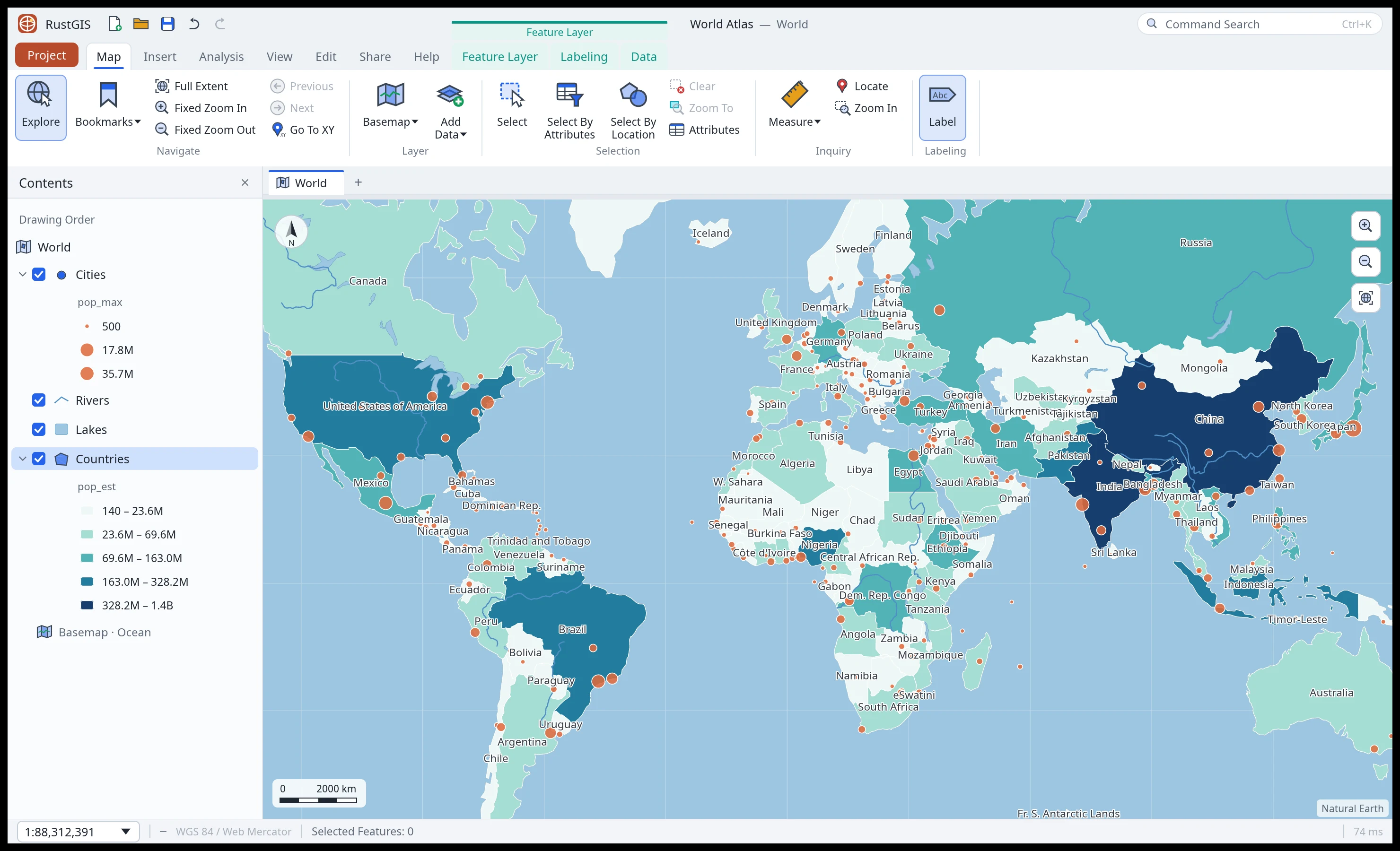
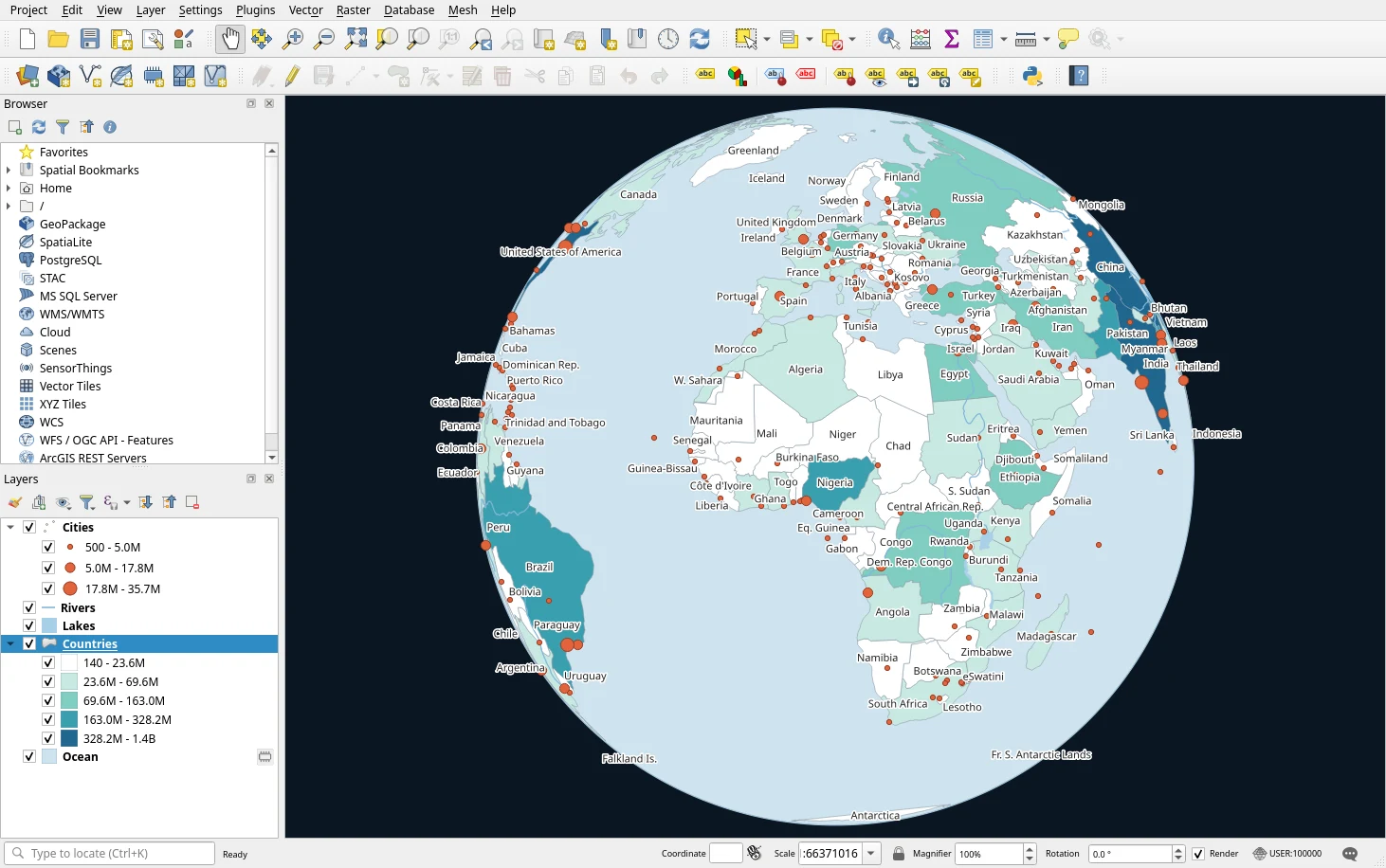
What they look like
The same World Atlas data, styled the same way, in each app.
Where RustGIS is stronger
- Installing it. RustGIS's core app is a single program with no Python, Qt or GDAL inside.
Packages include a portable Windows zip, a macOS DMG, AppImage,
.deb/.rpm, Homebrew, winget, the AUR and Fedora COPR. Optional GeoLibre tools, GDAL, DuckDB and process plugins use separate programs. QGIS installers bundle a Python interpreter, Qt, GDAL, GRASS and more. See Installation. - In the browser. The WebAssembly app runs at web.rustgis.app: add files, style them, load the optional 1,000+ GeoLibre/Whitebox suite, build layouts and export. Live database connections and external programs are desktop only, and GeoPackage export is not available on web. You can serve the static build yourself. QGIS has no official browser version; QGIS Server and qgis2web publish maps made on the desktop.
- A shared command engine. Ribbon actions dispatch commands with ids and JSON parameters.
Engine commands run from
rustgis-cli, therustgisPython package, notebooks, models, the Script pane, the MCP server and the AI Assistant. UI-only commands open panes and dialogs inside the app rather than running headlessly. QGIS's processing algorithms are scriptable throughqgis_processand PyQGIS, but much of its interface (styling, layouts, project setup) is reached through the PyQGIS object model rather than the same actions the buttons run. - An AI Assistant that uses the command engine. The AI Assistant works with Anthropic, OpenAI, Gemini, OpenRouter, Ollama or any OpenAI-compatible model with your own key, or with a ChatGPT sign-in. Project edits use the same undo system as the interface; file, network and plugin commands wait for your approval, and external side effects are not undone. An MCP server lets agents such as Claude Code, Cursor and VS Code drive RustGIS. QGIS has AI through third-party plugins.
- Sandboxed WebAssembly plugins. These RustGIS plugins use declared,
approved permissions and run on desktop, in
rustgis-cliand in the browser. Plugins can add commands, tools, ribbon tabs, panels and assistant skills. RustGIS also supports unsandboxed process plugins, including managed Python environments, on desktop and CLI. Like QGIS's Python plugins, these are trusted programs, not contained. - Cloud-native data without extra libraries. Cloud-optimised GeoTIFF, GeoParquet,
FlatGeobuf, PMTiles and Zarr are read in place by RustGIS's own readers, over HTTP byte ranges
and from
s3://buckets, on the desktop and in the browser alike. QGIS reads all of these too, through GDAL on the desktop. - A ribbon interface. Tabs follow the order of the work (Home, Data, Style, Edit, Analyze, View, Publish), with Command Search (Ctrl+K) to find any command or tool by name. People coming from ArcGIS Pro often find it familiar; people who know QGIS's toolbars may not want it, which is a matter of taste.
- A permissive licence. RustGIS is Apache-2.0, so its crates can be embedded in proprietary or differently licensed software. QGIS is GPL-2.0-or-later, which requires derived works to stay under the GPL. For running either program, both are free.
- Memory-safe core. RustGIS's workspace forbids
unsafeRust, checks file and parameter inputs, and has hostile-input tests for registered commands and built-in tools. This does not make external programs or unsandboxed process plugins a security boundary.
Where QGIS is stronger
- Format and database breadth. QGIS opens the formats its GDAL/OGR build supports, natively, and writes many of them. RustGIS reads a focused set of formats with its own code (see Data formats), including a native, read-only 2D File Geodatabase reader; compressed tables, raster fields and sparse row layouts need GDAL. DWG, JPEG 2000 and NetCDF also need GDAL's programs. QGIS connects to PostGIS, SpatiaLite, Oracle and SQL Server and edits in them directly; RustGIS reads PostGIS, MySQL/MariaDB and SQL Server/Azure SQL tables live (read only) and DuckDB databases through DuckDB, on the desktop.
- Coordinate systems. QGIS uses full PROJ: every CRS, datum transformations and grids, and layers kept in their own CRS. RustGIS holds vector coordinates as WGS 84 longitude/latitude and reprojects rasters and the map by EPSG code, which covers mapping and most analysis but not survey-grade work in a local datum.
- Editing. QGIS has a complete digitizing toolkit: reshape, offset curves, advanced digitizing with constraints, topological editing and geometry checkers. RustGIS creates, moves, rotates, scales, splits and merges features with snapping and templates, and moves, inserts and deletes vertices. Edits stay in the project until exported; RustGIS does not write them back to live databases.
- Processing. RustGIS has built-in spatial joins, geodesic buffers, A5 grids, IDW, ordinary kriging and shortest paths on line networks, plus the optional 1,000+ GeoLibre/Whitebox suite. QGIS combines its native algorithms with GDAL, GRASS and SAGA providers and has more complete built-in overlays, network datasets and spatial statistics. RustGIS's external suite is strong on terrain, hydrology, LiDAR and image analysis; its available tools depend on the installed runner.
- Cartography. QGIS's styling is the richest in open source: rule-based renderers, data-defined overrides on nearly every property through its expression engine, blending modes, geometry generators, a refined labeling engine. RustGIS covers the common renderers (single, unique values, graduated, proportional, aggregation, raster stretch/RGB/classified/hillshade), stacked line symbols, symbol levels, blend modes, layer groups and SQL-filtered label classes, without that depth.
- Print layouts. QGIS's layout designer and atlas are mature and detailed. RustGIS has publication presets, shaped map frames, legends, colorbars, scale bars, grids, tables, charts, map series, reports and PDF/PNG export.
- Plugins and integrations. QGIS has thousands of Python plugins for niche tasks, an in-app Python console, QGIS Server for OGC services, and QField and Mergin Maps for field work. RustGIS's plugin registry is new and small, and it has no server or mobile app.
- 3D and point clouds. QGIS's 3D map views, mesh layers and point-cloud rendering go further than RustGIS's globe, terrain-draped tilted views, 2.5D extrusion and LiDAR point layers.
- Maturity and community. QGIS has two decades of releases, a long-term-release cycle, translated documentation, courses, books, user groups and commercial support. RustGIS released its first version in 2026; many features are first versions and some workflows will have gaps. See the roadmap.
Side by side
| RustGIS | QGIS | |
|---|---|---|
| Licence | Apache-2.0 | GPL-2.0-or-later |
| Written in | Rust (egui, wgpu, tiny-skia) | C++ and Python (Qt) |
| First release | 2026 | 2002 |
| Download | One core program; optional external tools installed separately | Hundreds of MB (bundles Python, Qt, GDAL, GRASS…) |
| Platforms | Windows, macOS, Linux, and the browser (WebAssembly) | Windows, macOS, Linux |
| Interface | Ribbon with Command Search | Toolbars, menus and docked panels |
| Formats | A focused set read natively; more through GDAL when installed | Whatever its GDAL/OGR build supports (read/write varies by driver) |
| Coordinate systems | Vectors in WGS 84; rasters and the map by EPSG code | Full PROJ |
| Geoprocessing | Built-in tools plus optional 1,000+ GeoLibre/Whitebox suite | 1,000+ (native, GDAL, GRASS, SAGA) |
| Editing | Create, move, rotate, scale, split, merge, vertex move/insert/delete, snapping; export edits | Complete digitizing and topology tools |
| Scripting | Engine commands: CLI, Python package, notebooks, Script pane, MCP; UI-only commands stay in the app | PyQGIS, qgis_process, Python console |
| Plugins | Sandboxed WebAssembly; unsandboxed desktop/CLI process and Python plugins; registry | Python, thousands in the official repository |
| AI | Built-in assistant using engine commands and project undo; MCP server | Through plugins |
| Server and mobile | Static web build you can host | QGIS Server; QField and Mergin Maps |
| Project file | .rgis (open JSON) |
.qgs / .qgz (open XML) |
RustGIS for QGIS users
Most QGIS ideas have a counterpart under a different name:
| In QGIS | In RustGIS |
|---|---|
| Layers panel | Layers pane (left) |
| Browser panel, Data Source Manager | Browser pane, Home › Add Data, the Data Sources pane |
| Processing Toolbox | Tools pane (Analyze › Tools), or Command Search (Ctrl+K) |
| Graphical Modeler | ModelBuilder: a node canvas of inputs, tools and outputs, which can also build a model from your history |
qgis_process |
rustgis-cli run --cmd 'gp.run={…}' |
| Python console, PyQGIS | The Script pane and notebooks inside the app; the rustgis Python package outside it |
| Layer Styling panel | Style tab and the Symbology pane |
| Expressions (select, filter) | SQL WHERE clauses for selections and definition queries |
| Field Calculator | Calculate Field |
| Print Layout, Atlas | Layouts, Map Series |
| Plugin Manager | Plugins › Plugin Manager |
Project (.qgz) |
Project (.rgis), or a package (.rgispkg) with its data inside |
The User Guide walks through the interface, and Getting Started is a short tour.
Using them together
You don't have to choose. RustGIS reads and writes the formats QGIS works in, so data moves between them without conversion:
- Vector data: GeoPackage, GeoParquet, FlatGeobuf, Shapefile, GeoJSON, KML/KMZ, GPX and CSV, in both directions (GeoPackage export is desktop only).
- Rasters: GeoTIFF and cloud-optimised GeoTIFF.
- Colour ramps: RustGIS reads QGIS Style Manager exports (
.xml) and the colour ramp or raster colour map in a layer style (.qml); see Custom color ramps. - Web maps: MapLibre styles and OGC API Features collections exported from RustGIS can be served and opened anywhere, QGIS included.
RustGIS does not open QGIS project files (.qgz) or full QGIS layer styles; move the data
across and restyle it.
A common split is to do heavy editing, PROJ-dependent work and detailed cartography in QGIS,
and use RustGIS where a light install, the browser, scripting by command id or the AI Assistant
helps: a quick look at a GeoParquet on a laptop without QGIS, a map shared as a web app, a batch
of maps rendered by rustgis-cli in CI, or the optional 1,000+ GeoLibre/Whitebox suite
loaded in a browser tab.
Common questions
Is RustGIS a replacement for QGIS? No. It covers the everyday work of a desktop GIS (adding data, styling, labelling, geoprocessing, layouts, sharing) and does some things QGIS doesn't, but QGIS is far more complete. Use RustGIS alongside QGIS, or instead of it only if the gaps above don't touch your work.
Is RustGIS faster than QGIS? It starts quickly and is light to install, and its own readers draw large cloud-native files a view at a time. We haven't published benchmarks against QGIS, and speed depends on the data and the task, so try your own data in both.
Can I use my QGIS plugins in RustGIS? No. QGIS plugins are written against PyQGIS. RustGIS has its own WebAssembly and process-plugin interfaces, including Python process plugins; see Plugins.
Does RustGIS need GDAL like QGIS does? No. Its common formats, cloud-native formats and GeoTIFF are read by its own Rust code, which is also why the browser version works. GDAL is optional: when its programs are installed, RustGIS uses them for the formats it doesn't read itself.
Can I open a QGIS project? Not yet. Open the project's data in RustGIS (GeoPackage is the easiest route) and restyle it.
See also
- Full comparison: RustGIS beside GeoLibre, QGIS, ArcGIS Pro and ArcGIS Online
- Installation and Getting Started
- Data formats: what RustGIS reads and writes
- Command Line and Python: scripting RustGIS